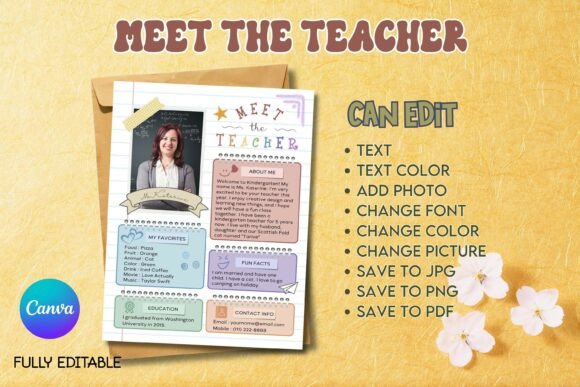
Meet the Teacher - B04: A Pastel Welcome for Your Classroom
First impressions matter, especially in education. The moment a parent or student walks into your classroom, the environment tells a story. It speaks of care, creativity, and the kind of atmosphere you’ve cultivated. For kindergarten, preschool, and elementary educators, establishing that warm, inviting tone is a foundational part of the job. The Meet the Teacher - B04 - Canva Template is a design asset built for exactly that purpose. It’s not just a piece of paper; it’s a handshake, a smile, and a preview of the welcoming space you’ve created.
The Visual Language of Warmth and Welcome
This template immediately communicates approachability through its visual style. The design leans into a soft, pastel color palette—think gentle pinks, calming blues, and muted greens that feel friendly without being overwhelming. The layout is clean and organized, prioritizing clarity so that essential information like your name, photo, contact details, and a personal message stands out. The typography choices are intentional, often blending a clean sans serif font for body text with a more playful handwritten font for headings. This combination strikes a perfect balance: it’s professional enough for a school newsletter yet personal enough to feel like a note from a friend.
The overall appeal of the Meet the Teacher - B04 - Canva Template is its versatility within a specific niche. It understands its audience. For a homeschool co-op, it can create a sense of community and belonging. For a traditional classroom, it’s a cornerstone of back-to-school night decor and parent communication. The design feels modern and fresh, avoiding the clip-art aesthetics of the past in favor of a more contemporary, graphic style that resonates with today’s design-savvy parents.
Beyond the First Day: Practical Applications for Educators
While its primary use is clear, the true value of a well-designed Canva template lies in its adaptability. Once you’ve customized the Meet the Teacher - B04 - Canva Template for introductions, you’ve established a visual theme you can carry throughout the year. This is how you build a cohesive brand identity for your classroom.
- Classroom Decor & Communication: Use the same color scheme and font pairing for bulletin board headers, name tags, and daily schedule boards. This creates a visually harmonious environment that reduces cognitive clutter for young learners.
- Digital Presence: The template is perfectly suited for digital sharing. Save it as a PDF or PNG to email to parents, post on your class website, or share on a private social media group. The clean layout ensures it looks sharp on any screen, making it a key piece of your web design for parent engagement.
- Newsletters and Updates: Maintain consistency by using elements from the template in your weekly or monthly newsletters. A consistent header, footer, and typeface choice helps parents instantly recognize official communication, building trust and professionalism.
- Open House & Event Materials: The design can be adapted for open house signage, volunteer sign-up sheets, or field trip permission slips. This level of visual consistency across all your materials elevates the perceived organization and care of your entire program.
Design Strategy: Making the Template Your Own
Getting the most out of the Meet the Teacher - B04 - Canva Template involves more than just filling in the blanks. Treat it like a starting point for your classroom’s visual hierarchy. Here’s how to approach it with a designer’s mindset.
- Start with Your Photo: The template is built around a central photo placeholder. Choose a high-quality, friendly portrait. A warm smile goes further than any script font in establishing a personal connection. Ensure the lighting is good and the background is relatively uncluttered.
- Edit with Intention: Canva makes customization easy, but resist the urge to change everything. The provided font pairing likely works well for readability. If you swap fonts, ensure the heading font (often a display font or handwritten font) remains distinct from the body text (usually a sans serif). Maintain a clear visual hierarchy so the eye flows naturally from your name to your role to the key details.
- Color Cohesion: If you adjust the pastel colors, stick to a limited palette of 2-3 complementary hues. This ensures the design remains calm and professional. Use your school’s colors as a guide if you want to create a stronger affiliation.
- Content is Key: Write your bio in a conversational tone. Share a fun fact, your teaching philosophy, or what you’re most excited about for the year. This is where you move beyond a generic typeface and inject real personality. The template is the frame; your words are the portrait.
Remember, this is a fully editable digital asset. You’re not locked into the sample text. You can adjust line spacing, move elements, and even add your school’s logo. The included Basic Canva Template Editing Guide is there to help if you’re new to the platform, making the process accessible even if you don’t have a background in graphic design.
In the end, the Meet the Teacher - B04 - Canva Template is more than just a convenient download. It’s a tool for thoughtful communication. It allows you to present yourself with the same care and professionalism you bring to your lesson plans. By creating a polished, warm, and consistent introduction, you set the stage for a successful partnership with families and a fantastic year for your students.